Compare Recordings
The Compare Recordings tabsheet takes two saved recordings of the same project – made with different settings – and reports how the two runs actually differ. It answers the question that watching two playbacks side by side usually cannot: did that change do anything, and how much?
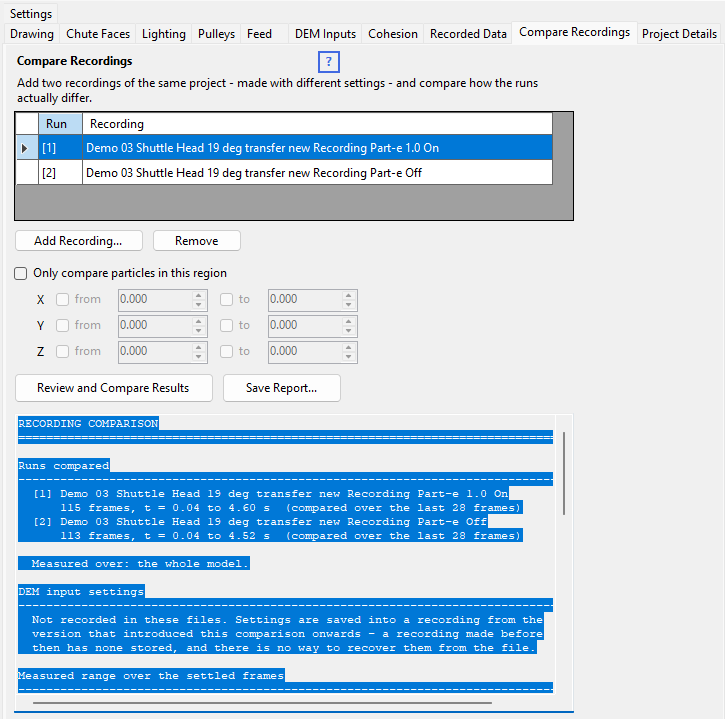
Running a comparison
- Run your model once, recording the calculation, and save the recording.
- Change the one setting you want to test, run it again for the same length of time, and save that recording under a different name.
- On the Compare Recordings tabsheet, press Add Recording... and pick both files. They are listed as run [1] and run [2].
- Press Review and Compare Results. Large recordings take a few seconds each.
Save Report... writes the report out as a text file.
Comparing only part of the model
Tick Only compare particles in this region to restrict the comparison to one area. Each axis has a from and a to bound, and you tick only the ones you need – an unticked bound is open-ended on that side:
| To look at | Set |
|---|---|
| Everything past a discharge pulley at X = 0 | X to 0 |
| The landing area just below it | X from −2 to 0 |
| A belt transition between 4 m and 7 m along | X from 4 to 7 |
| The loading skirt area, near the belt | X from/to for its length, plus Z to just above the belt |
| One side of the belt only | Y from 0 |
Bounds on different axes combine, so you can fence off a genuine box when you need one.
So if you expect a change to have done something and the comparison says otherwise, try again with the region narrowed to where you expect it to act, before concluding the setting did nothing.
What is measured
| Measurement | What it tells you |
|---|---|
| Particles | How much material is in the model (or the chosen region) at once. |
| Particles in contact | The percentage touching at least one neighbour – how densely packed the material is. |
| Mean nearest-neighbour gap | The average distance to each particle's closest neighbour. Negative means particles are overlapping. |
| Mean and max speed | How fast the material is moving. |
| Kinetic energy | The total energy of motion – the clearest single sign of how much energy a run is losing to damping and friction. |
| Mean height (z) | How high the material is sitting – useful for piling and build-up. |
| Spread X and Z | How far the material extends – whether a stream stays tight or fans out. |
Reading the report
Open an example report – Demo 03 Shuttle Head 19° Transfer, recorded twice with particle-particle restitution set to 0.1 and then 0.8. It opens in a new tab, so you can read it alongside this page.
DEM input settings
The report opens by listing the DEM inputs each run was recorded with, side by side, with any setting that differs between the runs marked <-- differs. This makes the report a record of the runs in its own right, so a saved report documents what was compared without relying on the file names.
It is also the quickest way to catch the commonest mistake in a comparison: that two things changed between the runs, not one. If more than one setting differs, the report says so and reminds you that what follows shows their combined effect and cannot attribute a difference to either one.
Measured ranges
Next is a table of the range each measurement covered over the settled part of each run (the last quarter of the recorded frames), which shows you the numbers themselves.
Where the runs genuinely differ
The last section is the part that answers the question. Each measurement is compared frame by matching frame, and a difference is only reported when one run leads far more often than chance alone would explain:
- clear – a difference this consistent would arise by chance less than once in a hundred comparisons.
- likely – consistent enough to take seriously (less than one in twenty), but worth confirming with a longer run.
- No reliable difference – the two runs swap places too often to tell apart on this measurement.
Comparing a run against an unchanged copy of itself is a good way to get a feel for this: every measurement should come back as no reliable difference, and anything that does not is telling you how much variation to expect before you trust a result.