Move a Layer
You can move a whole Layer to a new position – useful for adjusting the chute geometry to improve or alter the material flow.
- Right-click in the Layers table.
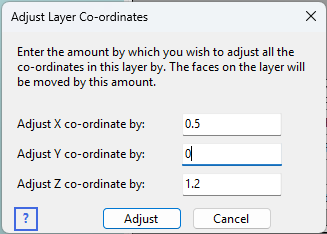
- Select Adjust X,Y,Z coordinates.
- Enter the distance (in metres) to move the layer by, in each of the X, Y and Z axes.
- Press Adjust to move the faces and close the dialog.
The program moves every Vertex of every Face in the layer by the amount you specify.