Rotate Layer
Right-click the Layers table on the Chute Faces tabsheet and choose Rotate Layer... to rotate every face in the currently selected layer about an axis and a rotation point, without having to move each vertex by hand.
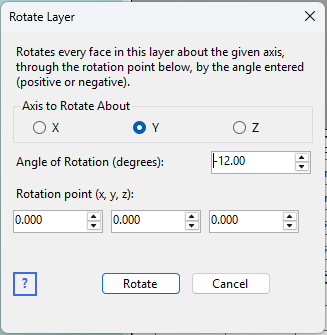
Choosing the rotation
- Axis to Rotate About – X, Y, or Z.
- Angle of Rotation (degrees) – positive or negative.
- Rotation point (x, y, z) – the world co-ordinate the rotation pivots around. Every vertex in every face of the layer is rotated about this point.
Click Rotate to apply. The vertices are left with full decimal precision (not rounded), so rotating a layer and then rotating it back by the same angle returns it to its original coordinates exactly.
Belt velocity rotates with the layer
If the layer has a non-zero belt velocity (Vx, Vy, or Vz in the Layers table), those velocity components are rotated by the same angle as the geometry – so you can set a belt's velocity along one axis (e.g. Vx = 5 m/s) and then rotate the whole layer into its final orientation, rather than having to recompute the velocity vector by hand afterward. A layer with zero velocity is left untouched (there's no direction to rotate).