Draw Lower Chute
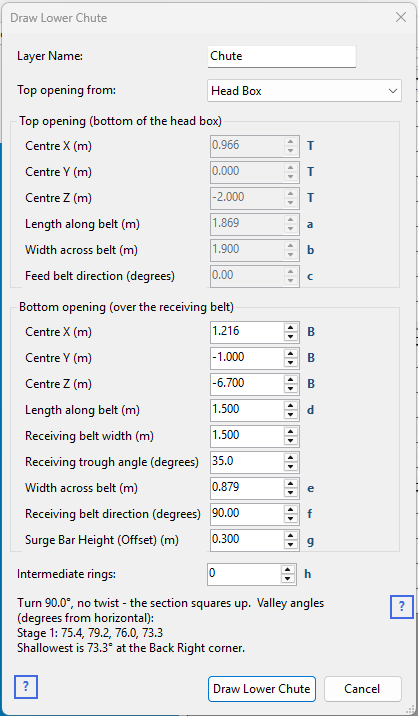
Right-click the Layers table on the Chute Faces tabsheet and choose Draw Lower Chute... to build the run of plate from the bottom of the discharge head box down to the loading point on the receiving belt.
Dimensions
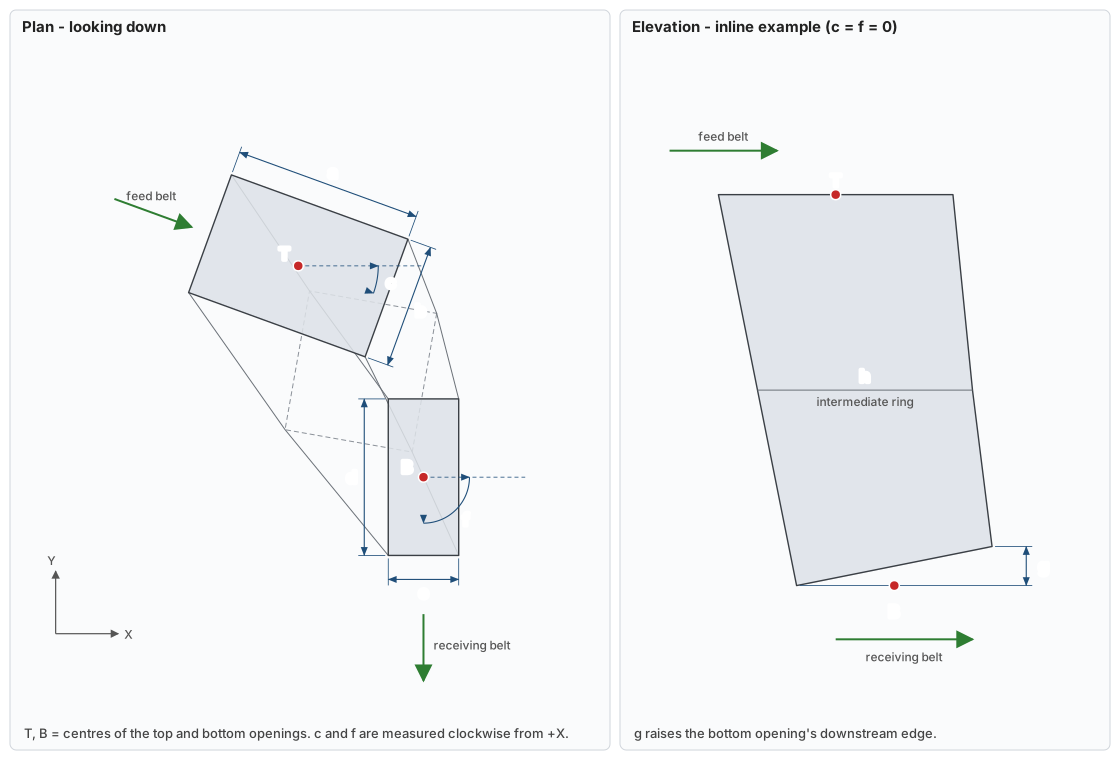
The small letters beside the input boxes match the dimensions on this drawing. The plan shows a turning transfer; the elevation shows an inline one, where the surge bar and an intermediate ring are easiest to see. The receiving belt width and trough angle only suggest the bottom width, and have no letter.
| Letter | Input | What it measures |
|---|---|---|
| T | Top opening Centre X, Y, Z | The centre of the top opening (the bottom of the head box). |
| a | Top opening Length along belt | Along the feed belt. |
| b | Top opening Width across belt | Across the feed belt. |
| c | Feed belt direction | The feed belt's direction of travel in plan, clockwise from +X. |
| B | Bottom opening Centre X, Y, Z | The centre of the bottom opening – the loading point. |
| d | Bottom opening Length along belt | Along the receiving belt. |
| e | Bottom opening Width across belt | Across the receiving belt, inside the skirts. |
| f | Receiving belt direction | The receiving belt's direction of travel in plan, clockwise from +X. |
| g | Surge Bar Height (Offset) | How far the bottom opening's downstream edge is raised above its rear edge. |
| h | Intermediate rings | The number of rings between the top and bottom openings. |
What it draws
A loft between rectangular rings – the top opening, the bottom opening, and any intermediate rings between them. Each stage contributes four panels named Front, Right, Back and Left, and each panel is drawn as two triangles.
The chute has no floor and no roof – it is open at both ends by definition. The rectangle it is open at the bottom is where the loading box picks it up.
The top opening
This is the head box's bottom opening, and the two have to agree exactly. Rather than ask you to retype the box's dimensions, the dialog lists every head box already in the drawing in the Top opening from box. Pick one and the six numbers below are filled in and locked.
The opening is recovered from the box's own Front Wall and Back Wall faces, so it keeps working after the box has been moved or rotated as a layer. Choose <enter manually> to unlock the fields for a chute that starts somewhere else.
The bottom opening
This sits over the receiving belt at the point the discharge is aimed at.
- Centre X, Y, Z – the loading point. Work this out from the discharge trajectory and the transfer height; see Chute Design Guidelines.
- Length along belt – how far the opening reaches along the receiving belt.
- Receiving belt width and trough angle – used only to suggest the width below. They are not part of the geometry.
- Width across belt – defaults to two thirds of the belt's projected width. Published guidance is explicit that this goes off the projected width and not the actual belt width, "as was common practice" – a troughed belt is narrower in plan than it is in the flat. Material has to land inside the skirts rather than on them, so the chute's opening follows the skirt spacing.
- Receiving belt direction – the direction of travel of the belt being loaded, in plan. Together with the feed belt direction above, this is the turn the chute makes.
- Surge Bar Height (Offset) – raises the front edge of the bottom opening above its rear edge by this much. A surge bar dams the stream at the bottom of the chute so material builds up and flows evenly out over it, rather than sliding straight out the front. BHP drawing 087-M-12386 shows this raised about 400 mm above the rear edge. Leave it at zero for a flat opening.
Intermediate rings
An inline, square or straight-reversing transfer lofts from top to bottom in one stage. Only an odd angle – anything that is not a multiple of 90° – gets an intermediate ring by default, so that the twist is taken in two gentler steps rather than one long one. The field is a suggestion – set it yourself and it stops following the turn.
Each ring is a real rectangle at an interpolated size, position and plan angle, so the plate edges between rings stay straight and the chute can be fabricated as it is drawn.
Valley angles
The dialog shows the valley angle at every corner of every stage as you change the numbers, and warns when the shallowest one falls below 45°.
Where two sloping plates meet, the line they meet along – the valley – is always shallower than either plate. Two plates at 55° meeting square in plan give a valley of about 45°. Material runs in the valley, not down the middle of a plate, so it is the valley angle that has to clear the material's friction angle. A chute whose plates look steep enough can still hang up in its corners.
How the demo projects are built
| Project | Transfer | Shape |
|---|---|---|
| Demo 10 Inline Coal Transfer 6600tph | Inline | One loft. The main sloping panel runs from the head box frame under the pulley, near the scraper plate, down to the boot. |
| Demo 12 Iron Ore 90 deg transfer Segregation | Square | Two stages, with a ring where the section turns from running along the feed belt to running along the receiving one. |
Once drawn, the chute is an ordinary layer: use Adjust X,Y,Z coordinates, Rotate Layer or direct vertex editing to adjust it, and Move Face to New Layer... to split a panel off on its own.